Thursday, November 30, 2006

How To: Make a "Shutdown" or "Restart" Desktop Icon

My girlfriend asked me to do this to her computer, but I forgot how! Thankfully, the nice people over at Instructables reminded me how to make a "Shutdown"or "Restart" or "Hibernate" or "Log Off".

Here's how: Right-click on a clear area of your desktop. Point your mouse over "New" (Don't click on it! I hate that!).
At the top of the next context menu, click on "Shortcut".
This will open a "Create Shortcut" wizard. In the "Type the location of the item" field, insert the following -

  • For "Shutdown" enter without quotations, "shutdown -s -t 0", then click "Next".
  • For "Restart" enter without quotations, "shutdown -r -t 0", then click "Next".
  • For "Log Off" enter without quotations, "shutdown -l -t 0", then click "Next".
  • For "Hibernate" enter without quotations, "rundll32.exe PowrProf.dll, SetSuspendState Hibernate", then click "Next".
After that you will now enter a name for the shortcut. Best if you enter what it is, but if you wanna be cute then enter whatever you want. Click "Finish".
Wait! I want to put an icon to my shortcut! Okay, calm down. Here's whatcha do:
Right-click on your newly created icon. At the bottom of the context menu, click on "Properties".
In the middle of the window nearer to the bottom is a button labeled "Change Icon". Click on that.
In the new pop-up window is a bunch of icons, click on any one of those. It's best if you choose the icon that matches whatever your shortcut does to avoid any sort of confusion. However, if you want to choose something else, that's fine. If you want a completely different icon than what's available, that's fine, too! Just click "Browse" at the bottom and go through your folders. Make sure the file you select is suffixed with ".ico". Click "OK".

That's it! Pretty neat, huh?

WARNING: Clicking on these shortcuts will immediately do what they're programmed to. There will be NO PROMPT asking "Are you sure?" or anything like that.

To see a step-by-step with pictures, go to Instructables, here.

Tuesday, November 28, 2006

It's Beginning to Look a Lot Like Firefox...

The holidays are upon us and what better way to celebrate than to ruin- er, decorate your Firefox?

The Tinseltown Firefox theme has everything here to make you feel like you're home for the holidays. It's complete with Christmas icons, snowflakes, lights, candy canes, you name it. So for those who know they're not getting coal in their stocking, download that bad-boy here.

Two of the Handiest System Utilities

CPU-Z is a very quick and dirty portable app for seeing quick info on a system. It gives you the skinny on processors running, memory and bus speed, and more! My only gripe is that it doesn't display graphics card specs.

The Windows Inspection Tool Set is for software what CPU-Z is for hardware. From the website: "(It) provides you with cross-linked, filtered views into a Windows system. View operating system information, processes, services, users, network interfaces and connections, file shares, printers and more. All views are linked allowing for easy navigation between related objects." Man, why couldn't this one be portable, too?

To get a copy of CPU-Z, click here (don't forget it can run from a USB drive).

To download WiTS, click here.

ClearType to See Better and A Better Way to Control It

ClearType helps you see better - period. It's a Microsoft PowerToy that aides one to be able to see typed text much clearer. However, what I see and what you see might be different. So how do I turn it off?

Enter QuickType; it sits in your system tray and acts as a "control panel" for ClearType. Very handy and straightforward.

To download ClearType, click here.
To download Quicktype, click this link.

Monday, November 20, 2006

Take Your Firefox With You

Ever go to someone else's house and want to show them something online or check your email only to find that their browser setup is akin to watching a geriatric porno?
I know I have. With that in mind (the idea, not the old people porn), may I introduce to you Firefox Portable!

From PortableApps.com, a site that has an amazing plethora of software for your USB drive, comes the ultimate portable webbrowser. Able to do every single thing that your tied down Firefox can do; Firefox Portable can even have the exact same settings and Add-ons from home.

If you don't have this on your thumb-dongle, what do you have?

To download Firefox 2.0 Portable, click here.
To read about my past posts on Firefox or other Add-ons, click here.

A More Advanced Way to View Your Images


Been looking for a better way to view your images than what Windows can do? Sure, you can zoom - even rotate your pics! Wow!
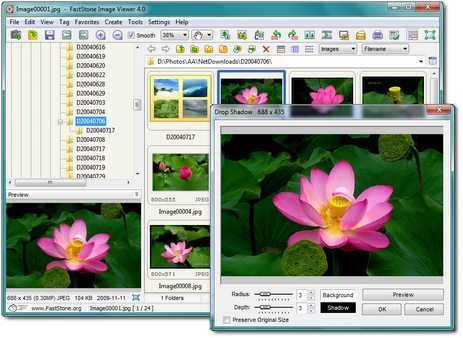
Well, for all of us who'd like a few more options, there's FastStone Image Viewer. This program has a bevy of features that can enhance your photo and image managing and light editing experience.

From the website; "...a fast, stable, user-friendly image browser, converter and editor. It has a nice array of features that include image viewing, management, comparison, red-eye removal, emailing, resizing, cropping and color adjustments. Its innovative but intuitive full-screen mode provides quick access to EXIF information, thumbnail browser and major functionalities via hidden toolbars that pop up when your mouse touch the four edges of the screen. Other features include a high quality magnifier and a musical slideshow with 150+ transitional effects, as well as lossless JPEG transitions, drop shadow effects, image annotation, scanner support, histogram and much more. It supports all major graphic formats (BMP, JPEG, JPEG 2000, animated GIF, PNG, PCX, TIFF, WMF, ICO and TGA) and popular digital camera RAW formats (CRW, CR2, NEF, PEF, RAF, MRW, ORF, SRF and DNG)."

It even makes a portable USB version of it to take along with you.

To download FastStone Image Viewer, click here.

Firefox Add-On: Context Search

The best way to search is with Context Search. Basically highlight the word or phrase, right-click it and it gives you a list of your search plug-ins. Pick one and that word or phrase you highlighted has search results are in a new tab. That's it! Why can't all webbrowsers with search plug ins do this?

To get Firefox, click here.
To get Context Search, click here or go to Mozilla's Add-ons page for it here.
To read about my past posts on Firefox or other Add-ons, click here.

Sunday, November 19, 2006

Need Some Fonts? How 'bout 13,000 of Them?


SearchFreeFonts.com is the perfect site to find and download the font(s) you need. Want a different look for your presentation? What about some wingdings for your Christmas e-cards? If you can't find it here, you probably won't find it anywhere else.

Giveaway of the Day - Free Commercial Software Once a Day

Imagine that you have a friend (an imaginary friend?) that comes over to your house every day with software for you to use on your computer that's never been installed or registered. That's what Giveaway of the Day does.

This website does something I've never seen before - it gives you one download of a company's software a day that you would normally have to purchase, free. Now so far, it hasn't offered the most groundbreaking software, but it's new and I happen to be excited about the idea. This site gives companies advertising and promotion by giving away its software for a limited time.

If you look at some of their past giveaways, it's mostly games and image editing stuff. But like I said, this idea has a lot of promise. I'm looking forward to what the future holds and what I can download tomorrow!

Click the link to go to Giveaway a Day.
To subscribe to their RSS feed, click the link.
To read the Download Squad article on them, click here.

Thursday, November 16, 2006

BetterSearch - The Firefox Add-on That Lets You See Ahead

I always wished, secretly in my tiny heart, I could know what the website of the search result I was clicking on looked like or 'preview' - if you will. Well, now I don't have to wish anymore!


Look! Thumbnails of websites in my search results! Amazon merchandise pics! YAY!

Yes, BetterSearch does that and other stuff, too. An Add-on for Firefox that lets you preview the websites in your search results and see Amazon merchandise, prices, and what-have-you. It has icons next to your results that can open that site in a new tab, go to that site without leaving the search page, and older cached versions of your selected site with Internet Archive's Wayback Machine. BetterSearch can be used to enhance Google, Yahoo!, del.icio.us, Windows Live Search, A9, Answers.com (web results), AllTheWeb, ask.com (Ask Jeeves), Clusty.com, and Simpy.com.

It's one of those extensions I can't live without and you shouldn't either.

Download BetterSearch here or from Firefox Add-ons here.

Search Everything with Google Desktop


Got a big hard drive? Wish you could search your files and find what you need quickly? What about your emails? What about all those things plus web search results? That's what Google Desktop is for. Google (Look, if you don't know what Google is, take your computer back to the store... NOW!) Desktop seamlessly indexes your important files, emails (only Gmail is available if you use webmail.) and web searches together when you search for anything.

Say you search for "butter". You will see in your search results -

  • Office documents you wrote about butter.
  • Images of butter you've saved from your digital camera.
  • Emails you sent to your best friend about butter.
  • Websites that deal with butter.
  • Websites that you've visited in the recent past that specialize in butter.
But wait, there's more! Google Desktop can also be used in a sidebar mode that can display all kinds of info including your email, photos, weather, time, searchbar, etc.
It also uses desktop widgets or as they like to call them "Google Gadgets" - teeny mini-apps that sit on your desktop.
Such Gadgets involve specialized searches, sports scores, stock tickers, games, and the like.

Very cool!

To download Google Desktop 4.5 here.

Wednesday, November 15, 2006

Foxit Reader - Reads PDFs Without Consuming Disk Space

Foxit PDF Reader does what it says. In fact, Foxit's website says, "In the past, you have to download a huge PDF Reader from other software company(sic), go through a lengthy installation process and wait for an annoying splash window to disappear just to open a PDF document. Moreover, if you want to annotate a PDF document, you have to pay US$299 to buy certain PDF software."

That "certain" would be Adobe - the makers of Adobe Reader - who installs their software on almost every computer known to have left assembly. Adobe Reader's size is around 20 mb. when installed on your system while Foxit's a mere 1.5 (Actually, I've seen Adobe PDF software reach much higher than 20 mb.).

Foxit PDF Reader doesn't install so you can take it on a USB drive.

Programs that are taking up too much space on a hard drive makes Windows go slower. Adobe is a big boy and a smaller faster kid that can do the job just as well - if not better - should replace it (like I did).

Download Foxit Reader 2.0 here.

Windowpaper XP Restores an Old Folder Option

Remember when you were using Windows 9x, Me, or 2000 and you could change the background image to anything you wanted? Remember when you were first tinkering with XP and realized you couldn't and you went into a violent rage and cried? No? Well, it doesn't matter 'cuz Windowpaper XP will let you change your folder backgrounds with ease to anything you want in your image collection. If you like to mod your folders, I highly recommend.

Download Windowpaper XP here.

Firefox Add-on: All-in-One Gestures

Use your mouse to execute common commands by "drawing" on the webpage you're viewing with your right mouse button. It's an awesome extension that can help with productivity. You can go back a page, forward a page, close a tab, etc. I whole-heartedly recommend this add-on and use it myself.

To download from homepage, click here.
Download the Add-on from Firefox's Add-on page here.

Make Things Transparent with AlphaXP Lite

I like cute little apps like this. While I don't personally have a use for it, AlphaXP Lite can make your taskbar and windows harder to see. The taskbar can be transparent until you mouse over it and you can control window transparency with keyboard shortcuts. Cute, indeed.

Tuesday, November 14, 2006

Clean All Those Crap Files with CCleaner

While Windows built in Disk Cleaner utility is okay - nothing, I mean nothing compares to the junk file cleaning power of CCleaner. This utility is one of the programs I cannot live without.
CCleaner (formerly known as Crap Cleaner) will clean the following -
Temporary files, URL history, and cookies from all your web browsers.
Windows Recycle Bin, Recent Documents, Temporary files and Log files.
Removes temp files and recent file lists from many third-party applications.
Advanced features to remove unused and old Windows Registry entries, including File Extensions, ActiveX Controls, ClassIDs, ProgIDs, Uninstallers, Shared DLLs, Fonts, Help Files, Application Paths, Icons, Invalid Shortcuts and more... also comes with a comprehensive backup feature.

Windows will run faster and CCleaner frees up valuable disk space and, in actuality, will keep your computer clean from spyware by cleaning out folders on your system that can harbor them.

Download it here.

When You Need a Big Free Clock...

Now, I'm not gonna lie to you. I needed a customizable clock that I could see across the room from my monitor. I typed into Google "big free clock" and that's exactly what I got. Big Free Clock was exactly what I was looking for. The pic above gives the little app no justice as the clock sits anywhere on your desktop and is completely customizable. Make it transparent, change or remove it's background and border and don't forget that you can resize it - Big Free Clock can get pretty big.

Download it here.

XP Zune Theme


Are you tired of staring at the same old boring blue or silver XP theme? Microsoft 's unveiling of the new Zune media player lead to so much excitement that they decided to make an official theme for all versions of XP. Sexy black borders, an ORANGE "Start" button, red close window button with grey window backgrounds. Verrrry nice! The only mention of Zune in the theme is in the wallpaper, which - if you have any self esteem - you will replace immediately.

Download the new theme from FileForum here.

Firefox -- The Best Browser in the World - Period!


IE sucks. Let's face it - it's a target for hackers and is updated infrequently. "Add-ons" are large sized and some even cost money.
Firefox is THE browser to use to avert all that and much more. You can have a browser that behaves ANY WAY you want. Extensions (Add-ons) are small and very plentiful. I just can't say enough.

Download Firefox 2.0 here. Afterwards, visit the Add-ons site here.

By the way, I will be posting Add-ons that I personally use or that I think can be useful soon.

My First Post!

Yeah, but not my first time. This site is dedicated to bringing you tips, tricks, programs, and reviews for free stuff. If you see something that sounds fantastic, it's free or there is a permanent free version. No trials, demos, shareware or the like.
I wanted to put together a site after making CDs of software that I downloaded and used. I hated to keep it up to date so I thought, "Why not put it online?"
This way I would keep it free for myself - not having to go through so many CD-Rs.
Also, there will be how-tos written either by me or ones that I've found online. All of the software has to be free or I won't post it.
Enjoy the ride. I hope you find what you're looking for.