Sunday, December 31, 2006

If You Have to Use IE, Use IE7 Optimized for Google (or Yahoo!)


Internet Explorer 6 was a hacker's wet dream. Spyware, security holes, browser hijackers, the list goes on. AOL proudly even used the IE engine in their software. I, myself, switched to Firefox and never looked back.

But like a drunken ex, you can't completely get rid of Microsoft's box of internet security doom. If you go to their website, you can't use some services unless it's through IE. So what to do?

If you haven't upgraded to Microsoft's somewhat improved Internet Explorer 7, get it through Google. In fact, it comes with Google's very own toolbar to "optimize" the browser people love to hate. Reason being is, if you don't upgrade to IE7, it's still a security risk just sitting there. That's right! Even if you don't use Windows' built-in browser, malicious software can take advantage of it.

To download Internet Explorer 7 Optimized for Google, click here.
Yahoo! also has their own optimized IE7. To get that, go here.

Saturday, December 30, 2006

AOL Finally Does Right - The Best Free Antivirus

You probably received a new computer for the Holidays thinking that your operating system will be protected. Think again! Lots - if not most - of new computers only come with free demo/trial software that makes you eventually pay. I say uninstall that Norton or McAffee and breathe easy.

Free is here! Yes, there is free antivirus software out there. I'm sure you've heard of AVG, but nothing compares to sheer power of AOL's Active Virus Shield.


Before we go on, I want to let you know that personally, I hate AOL. Their crappy dial-up service that you can try for free is almost impossible to cancel. Most of their other software is unspeakably horrible and I wouldn't give it to a homeless convict. All of AOL's software is pretty much free now so why bother? If you use dial-up - even if your parents have an account and you don't have to pay for it - get rid of AOL. If you use dial-up, go get the real internet and stop using dial-up. Broadband is inexpensive and lots and lots faster. After you get grown-up internet, go to AOL's homepage and then download everything you were once using that you like for free. AOL is almost an abomination.

Now with that said, AOL has branded the best free antivirus known to man at this juncture. It's called AOL Active Virus Shield.

AVS (as we'll call it) is only branded by AOL, not made by them. AVS is actually made by a company called Kaspersky Labs and Kaspersky's antivirus is quite expensive. AVS (a lower end version of their software), however, is free as the wind and protects like nothing I've installed before - free or paid.

If you've been fretting that you won't be able to afford antivirus protection after your demo, trial, or subscription runs out then fret no longer.

To download AOL Active Virus Shield, click here. (You have to enter your email to register the program but registration is free.)
To find out why AOL's so crappy and evil, click here.
To read PC World's Worst 25 Tech Products of All Time with AOL as #1, click here.
To visit the AOL homepage, click here.

Friday, December 29, 2006

Firefox Add-On: Customize Google with CustomizeGoogle


Firefox is awesome. Google is awesome. What if I could use my Firefox to customize the way I use Google? The answer is CustomizeGoogle.

Once installed, CustomizeGoogle does the following --

  • Removes ads
  • Adds links to competitors sites and searches
  • Allows you to use Google Suggest (suggest words while you're typing) anywhere on Google.
  • Rewrite links to point straight to the images in Google Images and more!

Very nifty! Works like a charm and no Google user/Firefox user should be without it.

Install CustomizeGoogle here.
Go to the Add-on's homepage and watch the introductory video here.

Wednesday, December 27, 2006

Fight Spam in Your Inbox


Sorry for not posting this past week, I took a long holiday.

I don't use Outlook or Outlook Express. However, you just might. If that's the case, I found a bit of software that can relieve you of some headaches.
It's called SPAMFighter. It does what it says - It keeps spam (or for those who don't know what spam is, it's junk email) out of your inbox. The company that makes it, uh.. SPAMFighter, is a Microsoft Certified Partner so credentials are on up high. Still, I don't use Outlook and its variants so I wasn't able to check this out myself.

Download SPAMFighter Standard here, (make sure to look on the left side of the page, the "Pro" version is on the right side.)

Wednesday, December 13, 2006

OpenOffice.org - Not Just an Office Clone


OpenOffice is a godsend to anyone that can't afford $200+ for Microsoft Office and its upgrades. A very powerful, open-source office suite that does much more than parade as an Office clone. A list of features for version 2.1 can be found here.

I use it. I wouldn't be dumb enough to pay what it costs to own and upgrade Microsoft Office. If I ran a newspaper, well... then I'd use Macs - which there's a version of OpenOffice for. The only way I'd run Microsoft Office is if it was free with free upgrades. OpenOffice has those features and unfortunately Microsoft's bloated suite does not.

Now don't get me wrong, I love Windows. I like fooling around with Linux occasionally (and every major distro I've run came with - guess what? - OpenOffice) but Windows is where my heart is. Even still, I find it damn hard to justify spending two or three hundred bucks on a piece of software I would use only occasionally, if not every day. Sure, Office is the king of document/word processing/spreadsheet all-in-ones, but OpenOffice fits all that I need fitting in this area.

Very highly recommended, considering the alternative. It works about as well, is compatible with all your writing documents, and there's no friggin' "Clippy". You know - that little animated paper-clip that "helps" you use Office. If you need pop-up help in OpenOffice, a light bulb pops-up at the bottom of the screen. Very unobtrusive, in fact; I used OpenOffice for a week before I noticed it.

Put your checkbook away. OpenOffice just saved you hundreds of dollars.

To download OpenOffice.org, click here.
There's also a USB portable version which you can get here.

Sunday, December 10, 2006

Gmail - The Ultimate in Free Email


I've used them all, MSN Hotmail (soon to become Windows Live Mail), Yahoo! Mail, AOL, Mail.com, my own ISP, and others. However, when I need an absolute, hands down, as-many-features-as-you-can-cram-into-it email service -- Gmail is it.

Gmail is without a doubt the most robust email service available. Owned by Google, you can be assured that it's nothing but quality. With over 2.5 gigs of storage (and counting), 10mb attachments, integration with other Google services and POP3 access, there are few reasons why Gmail shouldn't be on your radar.

Here's a small rundown of some of Gmail's features -

  • Gmail is webmail and can be accessed from any computer with any browser. It can integrate with any POP email desktop client (all versions of Outlook, Mozilla Thunderbird, etc.) and Google Desktop.
  • Gmail uses labels (or "tags") instead of folders to more easily find and archive messages.
  • Gmail features built-in Google search, and as with Google's keyword-based web search, Gmail returns fast, accurate results. As long as you archive instead of delete, you'll be able to find any message you've ever sent or received.
Gmail is what I use and after knowing how other email services work, there's no going back.


To get started with Gmail and read more about it, click here.
To read more about Gmail's features, click here or take the Gmail Tour.
To read my previous post of Google Desktop (which you don't need to integrate with Gmail), click here.

Saturday, December 9, 2006

Firefox Add-on: CookieSafe

There are lots of bad things waiting to get you on the internet. Doing a routine spyware scan will reveal that, but did you notice all those tracking cookies?

Not all cookies are bad, sometimes they come in handy. They can keep you logged-on to sites that you frequently visit and help personalize your web experience. However, some are just plain bad for you - tracking where you go, what you do, or worse.

That's where CookieSafe comes in. CookieSafe is a Firefox Add-on that can block all but the cookies you want to allow on your computer. From the author: "(CookieSafe) will appear on your statusbar (after installation). Just click on the icon to allow, block, or temporarily allow the site to set cookies. You can also view or clear the cookies and exceptions by right clicking on the statusbar icon."

Now you can more easily interact with the good-guy sites and leave the bad-guy sites in the dark about what you're doing on the web.

To download CookieSafe from Firefox's Add-ons site, click here.
To view other Firefox Add-ons I've covered, click here.
Download Firefox 2 here.

Media/Music Player Rundown - Nullsoft Winamp

Winamp used to be the second best music/mp3 player available; nowadays it's way down the line.

So what's it good for? As far as I can tell, the free version of Winamp can't do anything that other players can do. Nullsoft Winamp is owned by the almost completely evil AOL and - ever since they bought the player to use as a build-in for their god-awful AOL dial up garbageware - the Winamp player has been a shell of its former self.

There are a few good points, though. Winamp does a very good job of managing and making playlists of your song collection. It also does a pretty good job of playing video, especially streaming video.
Audio quality has always been topnotch but if you want it to rip a CD, the free version of the player does it at the amazingly slow 2x speed. It doesn't rip any music into an mp3 format, in fact it doesn't rip into AAC or Windows media formats, either.
If there are any selling points for poor old Winamp, it just happens to offer free XM Satellite Radio (which you can listen to for free at AOL's website) and it's fun to customize your player with skins, plugins, and visuals.

Sorry, but unless you pony up $19.95 (and we don't do that here), the free version of Nullsoft's Winamp just doesn't seem to be able to cut it anymore.

To see for yourself, download Nullsoft Winamp 5 (free version) here.

Tuesday, December 5, 2006

Media/Music Player Rundown - iTunes


I have no use for iTunes. I don't buy music online and I don't own an iPod.

That being said, the above statement doesn't mean that it's bad. In fact, it's probably the second best music player for Windows (The first being Windows Media Player 11). Apple's iTunes does just about everything that WMP11 can do and then some with features such as Cover Flow, allowing you you to flip through your music as if you were flipping through CDs. It also has lots of TV shows that can be downloaded at $1.99 a pop and songs for as low as $.99.

It wouldn't be fair not to cover iTunes, which is in and of itself free. It does a great job managing your music collection and lots more. Besides, if you happen to own an iPod, iTunes is the essential. I'm just not big on the program being a nice front to buying online.

To download iTunes (+Quicktime), click here.

Monday, December 4, 2006

Media/Music Player Rundown - Windows Media Player 11


Windows Media Player 11 is without a doubt a beautiful, well-endowed player. This is the one I use above all others.

Why? Because it does the one thing other media players don't: makes perfect rips of my CDs. It always makes perfect copies time and again. I don't use an iPod, so there's no need for iTunes. I don't care for music stores and I'm not picky about organizing my music or playlists. However, if you are, Windows Media Player 11 does a damn fine job of doing so. My only real problem is that it takes way too long to load up when playing video off the internet.

It's sleek, fine, does everything you need it to (unless you own an iPod) and gives you a glimpse at what Windows Vista has in store.

To download Windows Media Player 11, click here.

Instant Messaging Made Easy - Gaim

How many Instant Messengers do you have running on your system? You've got AIM (AOL Instant Messenger), Yahoo! Instant Messenger, Windows Live Messenger (formerly MSN Messenger) ICQ (which is owned by AOL), and Google Talk (which is an extension of Jabber).

If you have a teen in the house, you have all of them. This is why your computer takes forty minutes to load up. With those same messengers running in the background, it can slow down any system to a screeching halt.

Unless you're using video messaging, Gaim is the way to go. Gaim is a light-on-resources instant messaging client that can take your accounts and buddies and put them in one app. It doesn't need any of the other IM programs installed to work, all you need to do is make sure you set up accounts with them. As with some other free programs, Gaim was an instant messenger client placement for Linux.

Although its interface is bland compared to the previously mentioned IMs (nor does it use video messaging or phone calling), Gaim does something none of those do: combine all your accounts to run under one program.

To download Gaim for Windows, click here.

Oh my gosh! I forgot... There's also a portable version of Gaim. Run it from your USB stick when you need to chat away from home.

To download Gaim Portable, click here.

The Next Best Photoshop - The GIMP


The GIMP has to be - hands down - the best free professional image editor you can get. Originally made for Linux (since there's no Photoshop for Linux), The GIMP is an amazing, full-featured image editor aimed to do the things that Photoshop can also do.

But wait! Is Photoshop better? In a word, yes.

Adobe Photoshop is the bastion of pro image editing used by any firm or company using Windows. However, this site is more dedicated to the home user. If you really want the best, that's fine! Hop in your car and go to Office Depot, go to the software section and pick yourself up a copy. "Hey!" exclaims Mr./Ms./Mrs. Wants-the-very-best. "My box is empty. Oh, well. It must be to keep shoplifters from taking it. I'll just walk back over here to the space that I picked it up and..."

You set the box down after glancing at the price tag and walk out of the store.

Yeah. What you just saw was a $700 expense. That's the full version. The upgrade alone is $400. Even if you have Adobe Photoshop on your computer (assuming that you bought it on your PC preinstalled), you're gonna hafta upgrade sometime.

That's okay, though. The GIMP - which, despite the funny name that means GNU Image Manipulation Program, can do almost anything that Photoshop can do - is FREE!

There's more: The GIMP can be a harsh learning curve for folks switching over from Photoshop. That can be discouraging. However, there's a light at the end of the rainbow on the other side of the greener grass.
GIMPShop is a version of The GIMP set up to look and feel a lot more like its rediculously expensive rival.
There also happens to be a myriad of tutorials and how-to's to get you started in the right direction.

So if you're an artist, a graphic designer, or just someone that wants to blackmail your boss by imposing his head in a gay porn scene, this just might be the money-saving solution you were looking for.

To download The GIMP for Windows, click here.
To download GIMPShop, click here.

Just to give you an idea of something that The GIMP can do that Photoshop doesn't - it has a portable version, too! Load it onto a USB key, go to a friend's house and spread the image editing love.

To download The GIMP Portable, click here.

Saturday, December 2, 2006

A Free Way to Keep Up With Your Money


Have you used Microsoft Money or Quicken? I bet you've wondered if there's a cheaper way to manage your finances without spending it all on a new copy of the two money software rivals previously mentioned.

Well...

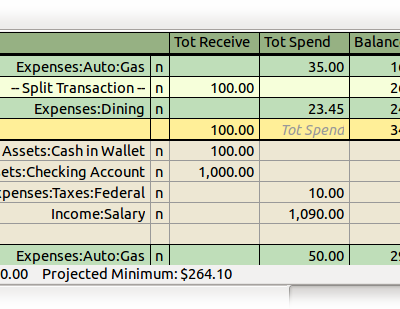
Introducing GnuCash. Originally programmed for Linux, GnuCash does all you can expect and perhaps a bit more. GnuCash features the following:

  • Full featured check register and general ledger.
  • Double entry of accounts.
  • A full suite of standard and customizable reports and graphs.
  • Income/expense account types.
  • Multiple currencies.
  • Stock/mutual fund portfolios that can update automatically via exchange sites (i.e. Ameritrade).
  • Small business accounting.
  • QIF (Quicken) file import. They are automatically merged to eliminate duplicate transactions.
  • Supports the Open Financial Exchange protocol.
  • Support the German Home Banking Computer Information protocol for German users.
  • Statement reconciliation.
  • Multi-language support.
  • Transaction finder.
  • Check Printing.
  • Scheduled transactions for mortgage and loan payments with reminders.
  • User Manual and help.
Wow! All this for free? I personally have never seen as robust an app as this for handling money for nothing. It seems to show the best of both worlds of features as illustrated in Intuit and Microsoft's accounting programs.

Bottom line - if you have a large expense account or a small business, give GnuCash a try. You probably won't go back.

To download GnuCash, click here.